
Good teaching relies on finding the right analogy. I don’t think of analogies as simplifications as if we are dumbing something down. I think of them as a symbolic language: a different way of encoding the same idea, one that happens to be far familiar for our brains to grasp.
Understanding how GPUs work is genuinely hard. There are billions of transistors, layers upon layers of design decisions, and a gap between what the hardware does and what a programmer sees that took decades of engineering to bridge. In my Efficient Models class, I employ two analogies that I believe help understanding inner workings of GPUs.
The first analogy comes from Tim Dettmers, and it is simply brilliant. He compares CPUs and GPUs to a racing car and a truck.

A CPU is the racing car. It is built for speed and responsiveness for tasks that are dynamic, unpredictable, and sequential. Think of a courier driver navigating a city: a new delivery arrives, the route changes, an order gets cancelled, traffic builds up on one street and clears on another. Every few minutes the driver has to make a fresh decision. That kind of rapid, adaptive thinking is exactly what a CPU excels at. It is fast, flexible, and able to react in real time.
A GPU is the truck. It is not built for that kind of fast decision-making. Put a truck in the middle of rush hour and ask it to recalculate its route every thirty seconds, and you have a problem. But give it one clear job load up, follow the route, deliver everything at once and nothing beats it.
Now, that delivery car does not operate alone. Accepting orders, declining them, talking to clients, handling cancellations all of that requires a support team. And because the work is so dynamic, that team needs to be large. The truck, following a fixed route with a predictable load, barely needs one at all. This maps directly onto how CPUs and GPUs are built: a large portion of a CPU chip is dedicated to control logic, the circuitry that handles decisions and adapts on the fly. A GPU trades most of that away in favour of raw compute units, because its work is regular enough not to need it.
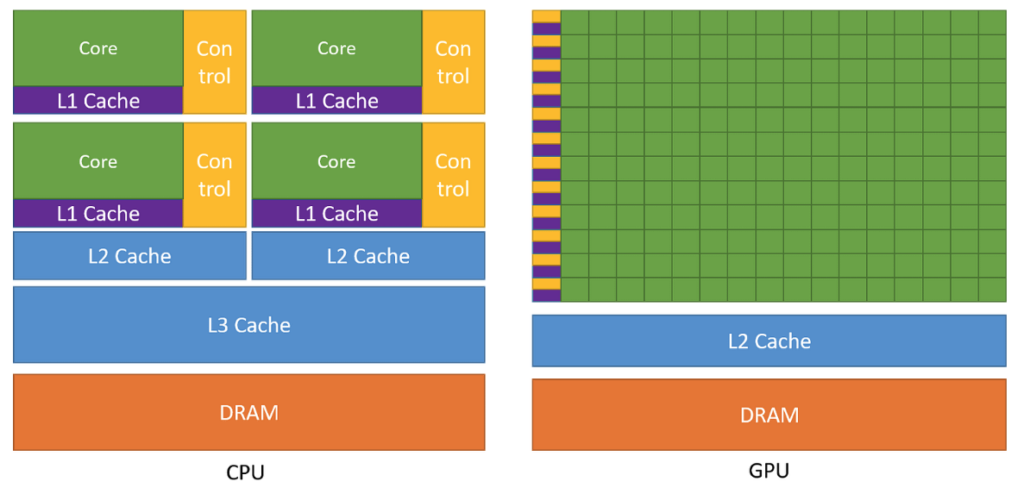
But once you scale this picture up a whole fleet of trucks, racing cars, support teams, loading bays, warehouses near and far a new kind of problem emerges. It is no longer just about speed or load capacity. It is about management: how large should each support team be, where do you place the storage units so vehicles can reach them quickly, how much can each unit hold?
Here is where I find a second mental model useful one I had to develop to explain inner structure of GPUs in in layman’s terms.
Let’s think of a GPU not as a single vehicle, but as an entire construction project and your job is the site manager.
On a construction site, you have hundreds of workers (threads). They are grouped into teams (warps and blocks). Each team works on its own section of the building (a tile of the matrix). Materials are stored either in a large warehouse far away slow to access but vast (global memory, your 40–80 GB of GPU RAM) or in a small on-site storage shed that each team can reach in seconds (shared memory, just 64 KB per processor).
Now we create some structure and hierarchy to run the construction efficiently.
| Construction site | GPU concept | Notes |
|---|---|---|
| The entire construction company | GPU | Manages thousands of workers across many sites |
| A building site | SM (Streaming Multiprocessor) | One site with its own foreman, equipment, and crews |
| A housing complex project | Block | One assignment given to one site e.g. “build 128 identical units” |
| A specialist crew of 32 workers | Warp | All workers do the same task simultaneously |
| An individual worker | Thread | One person, one task |
| Personal tools | Registers | Instant access, private to each worker |
| The on-site storage shed | Shared memory | Fast, shared within the crew, limited space |
| The distant warehouse | Global memory (VRAM) | Vast but slow to reach — 40–80 GB |
| The site foreman | Scheduler | Assigns crews to tasks, keeps work flowing |
The key insight: a good site manager does not send workers to the distant warehouse every time they need a nail. You batch the trips. You figure out in advance what each team will need, move it into the on-site shed, and let the workers operate from there. This is exactly what tiling does in GPU programming, loading small chunks of data into fast shared memory and reusing them as many times as possible before going back to global memory.
Caches and register are just storage units located and optimized for efficiency of the entire construction process.
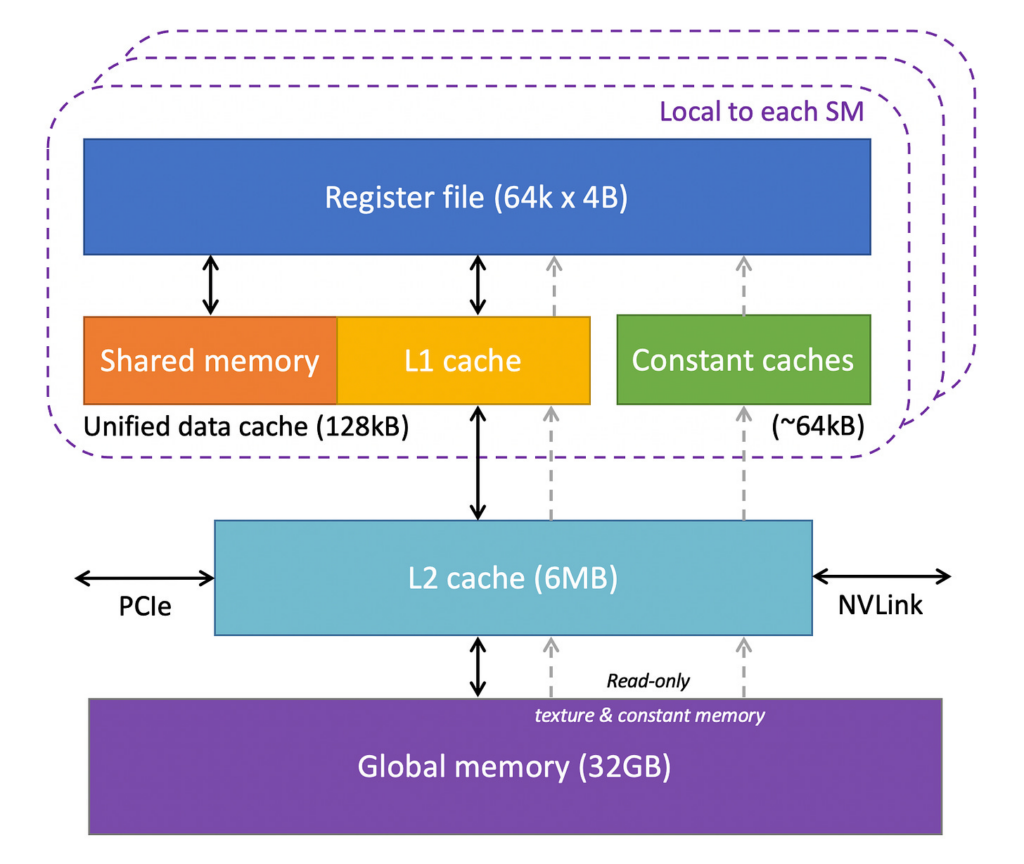
And just like a construction site, the bottleneck is rarely whether your workers are strong enough. It is almost always a coordination and logistics problem. Are teams waiting on each other? Are workers idle because materials have not arrived? Are you sending too many small trips to the warehouse instead of batching them?
This is why GPU programming is as much about memory management as it is about raw computation. The hardware is powerful. Using it well requires thinking like a site manager planning who works on what, when, and with what resources close at hand.
Why these two analogies together?
The truck analogy answers the first question everyone asks: why use a GPU at all? The construction site analogy answers the question that comes next: what is happening inside?
Understanding GPUs well means holding both pictures in your head at once the truck that moves everything in parallel, and the construction site that has to be organised carefully to actually use that capacity.
Hope these mental models help!